HEIC vs JPG: Quality, Size, and When to Use Each
2026-01-22 · Updated 2026-06-16 · 10 min read
HeicSave team
We test HEIC workflows on Windows 11, macOS, Chrome, and Edge before publishing. Editorial standards
Last updated: June 16, 2026
Both formats hold photos. They optimize for different things—storage on iPhone vs opening on a random Windows PC from 2014.
What is actually inside the file?
HEIC is a container. The still image is usually compressed with HEVC (H.265), the same family as efficient iPhone video. JPEG uses older DCT compression. Same scene, similar look: HEIC is often about half the bytes.
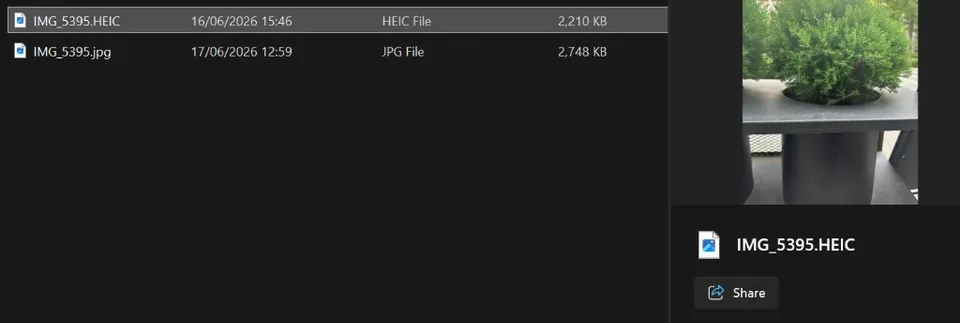
That size gap is why Apple made HEIC the camera default in iOS 11. It is not magic—just a newer codec with better compression.
File size in practice
HEIC wins at the same perceived quality. A vacation folder syncs faster and uses less iCloud space.
Compatibility
JPG opens in email, print shops, government portals, and old software. HEIC needs modern support or a conversion step on Windows.
When to keep HEIC vs convert to JPG
| Goal | Format |
|---|---|
| Maximize iPhone storage | HEIC on phone |
| Email to anyone | JPG |
| Upload to legacy web form | JPG |
| Long-term archive on Windows HDD | JPG (or PNG for lossless) |
| Edit in Photoshop on Windows without codecs | Convert first |
When to use PNG instead of JPG
Use HEIC to PNG for lossless raster, transparency, or avoiding JPEG artifacts before more editing. PNG is larger; JPG is fine for sharing.
See HEIC to PNG: when and how.
Quality when you convert
At high JPEG quality both look excellent. On HeicSave set the slider (default 90%) before converting. We copy common EXIF when the browser allows; GPS and rare fields may still drop.
Recommendation
Keep HEIC on the phone for storage. Convert to JPG when sharing outside Apple’s ecosystem. Use HEIC to PNG when you need lossless workflows.