Why iPhone Uses HEIC Instead of JPG
2026-01-18 · Updated 2026-06-16 · 8 min read
HeicSave team
We test HEIC workflows on Windows 11, macOS, Chrome, and Edge before publishing. Editorial standards
Last updated: June 16, 2026
Since iOS 11, iPhone cameras save stills as HEIC by default. Apple wanted smaller files on device and less iCloud bandwidth. That part works.
The pain starts when someone on Windows double-clicks the file and gets nothing useful—or when a school portal rejects the upload.
The sharing problem
Windows PCs, older Android phones, and most email clients still expect JPG. Print shops and HR forms are the same story. Conversion tools exist because Apple’s default and everyone else’s default never matched.
"Transfer to Mac or PC": Automatic vs Keep Originals
Settings → Photos → Transfer to Mac or PC controls USB exports:
- Automatic — iOS sends JPG only if it thinks the PC cannot read HEIC. Driver and codec changes on Windows 11 confuse this; you may still get HEIC.
- Keep Originals — always HEIC.
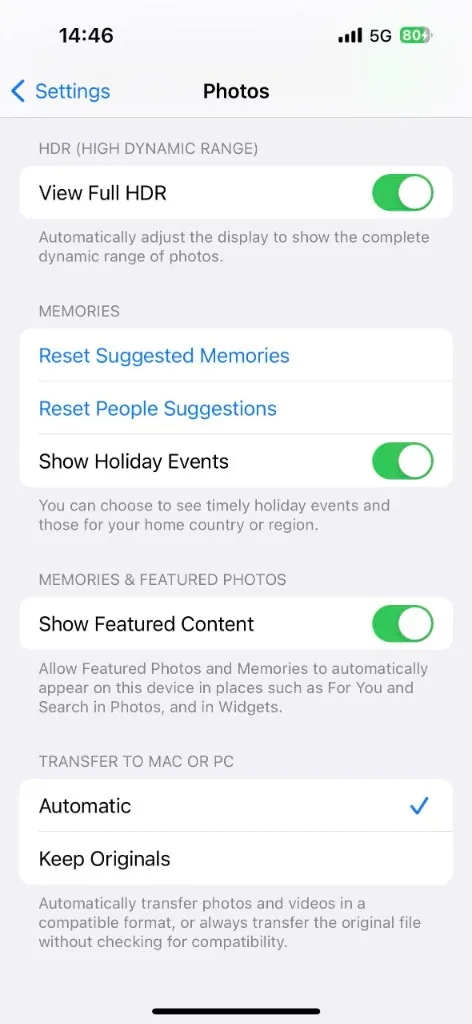
If Automatic keeps failing you, convert after copy or change camera format (below).
Switch to JPG on iPhone (new photos only)
Settings → Camera → Formats → Most Compatible makes new shots JPEG. Photos already on the phone stay HEIC until you convert them.
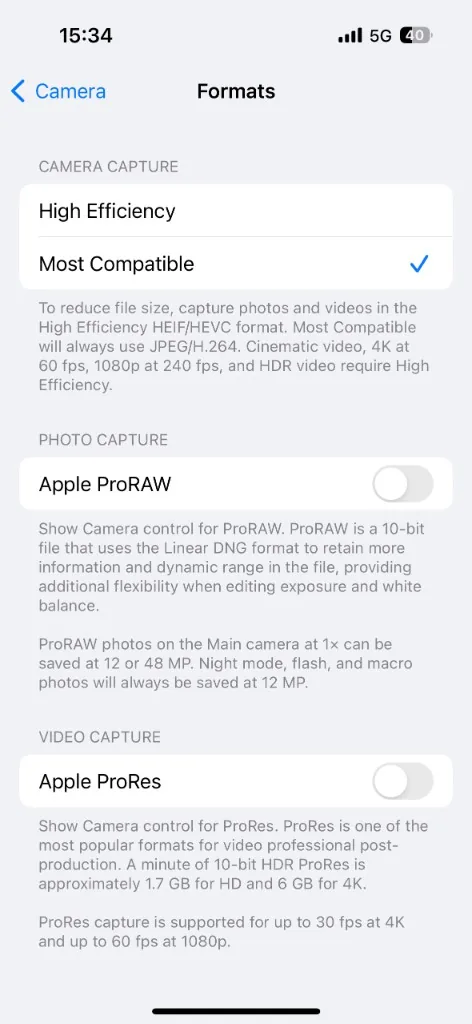
Step-by-step with trade-offs: Turn off HEIC on iPhone.
Convert existing HEIC
Use our HEIC to JPG converter: runs in your browser, no account, no watermark. Drop a folder, pick JPEG quality, download a ZIP if you converted an album.
After USB copy on Windows, see Transfer iPhone photos to Windows.